Admin Skins tutorial!
I'm aware there's already a tutorial to use the script on YouTube, but I found that a little confusing, so I made a little tutorial here in case the video doesn't help :D
You can still watch the video here
Copy this (you can expand it if needed)
STEP TWO:
Go to miniblox, open the console via ctrl+shift+J or with F12
it should look like this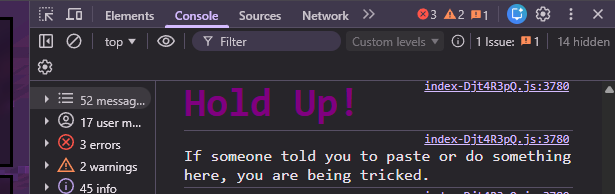
Go ahead and paste in the script on the into the console, don't enter it yet.
Also note that the console may have you confirm that you trust the script before enterring it.
Anyways, after that go to the Network tab (it should be to the right of console and sources) then refresh your page.
Hold on for a moment, and then look for a file that says {;} me, and open it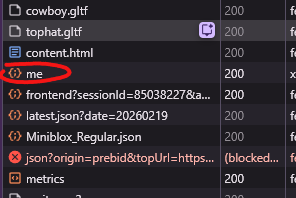
After that, you'll see a few sections, go to the Request Headers section and look for something that says Authorization with a long code to the right. Copy the code, and go back to the console.
Then replace the part of the script that says AUTHID with the code.
Remember to never share your authorization code.
STEP THREE:
Take a look at the skin you want, and its name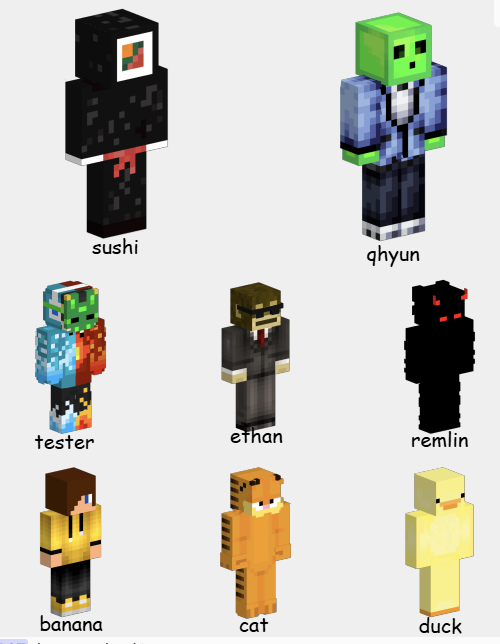
Once you have a skin you like, take its name and replace the part of the script that says SKINID with its name. Don't use capitals.
After that, you should be ready to enter!
just make sure you have 500,000 coins beforehand.
Oh and also, don't forget to refresh the page again once you enter the script, so you can tell if it worked!
If something didn't work, feel free to ask :D
Back